

Reviews & customer photosNew
Ask every customer for a review, the same way, every time
Get more Google reviews: add customers after the job and Reviews asks them on schedule, tracks who opened, visited, and reviewed, collects job photos, and puts the reviews you pick on your aiKit website.
Free account, no card. Already using aiKit? Log in to open Reviews & customer photos
What you get
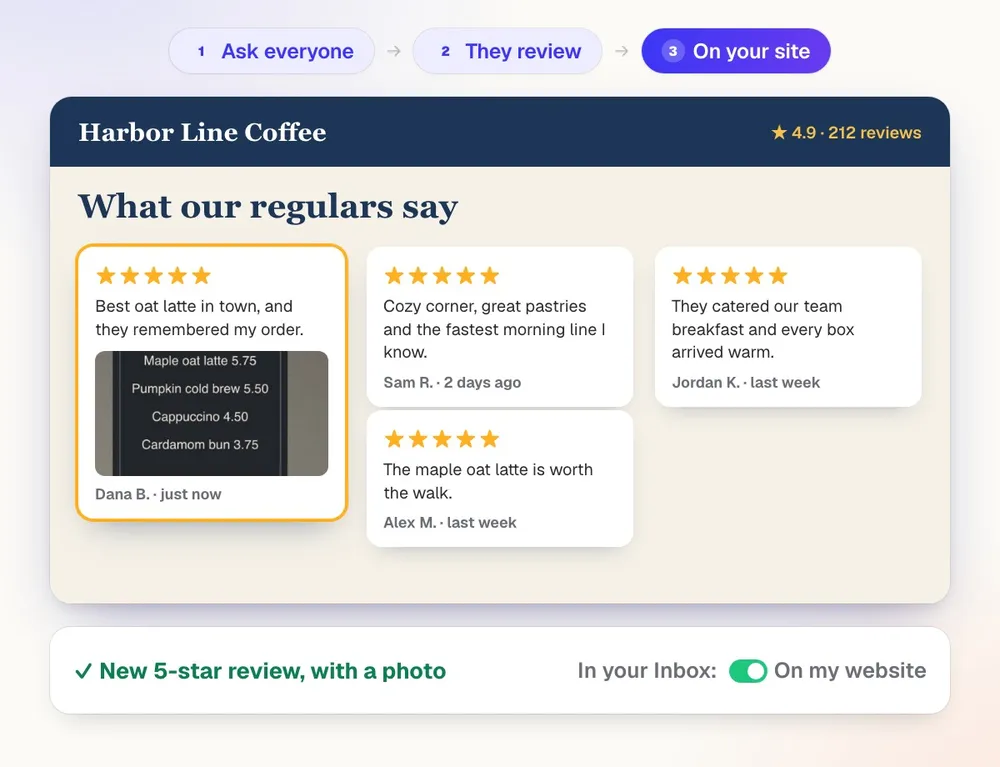
Ask every customer for an honest review after the job, track who opened and reviewed, and publish the reviews and job photos you choose to your website.
The same ask for everyone
Every customer gets the same email, the same page, and your Google link before and after they rate. Wording that gates or rewards reviews is blocked before it can be saved.
Every number is a door
Scheduled, Sent, Opened, Clicked, Reviewed, and Went to Google each open the exact customers behind the count, with each customer's history step by step.
Reminders that stop on their own
Up to two reminders (days 4 and 10 to start) that stop the moment the customer opens their page, reviews, or asks for no more emails.
Real photos of real work
Customers add photos and short videos from their phone, each with its own OK-to-show box. Publish one and it's also saved to your Graphics Library for posts and pages.
A reviews wall that updates in a minute
Publish a review or photo and it shows on your aiKit website's reviews page within a minute, newest first, never sorted by rating.
Asks itself after the job
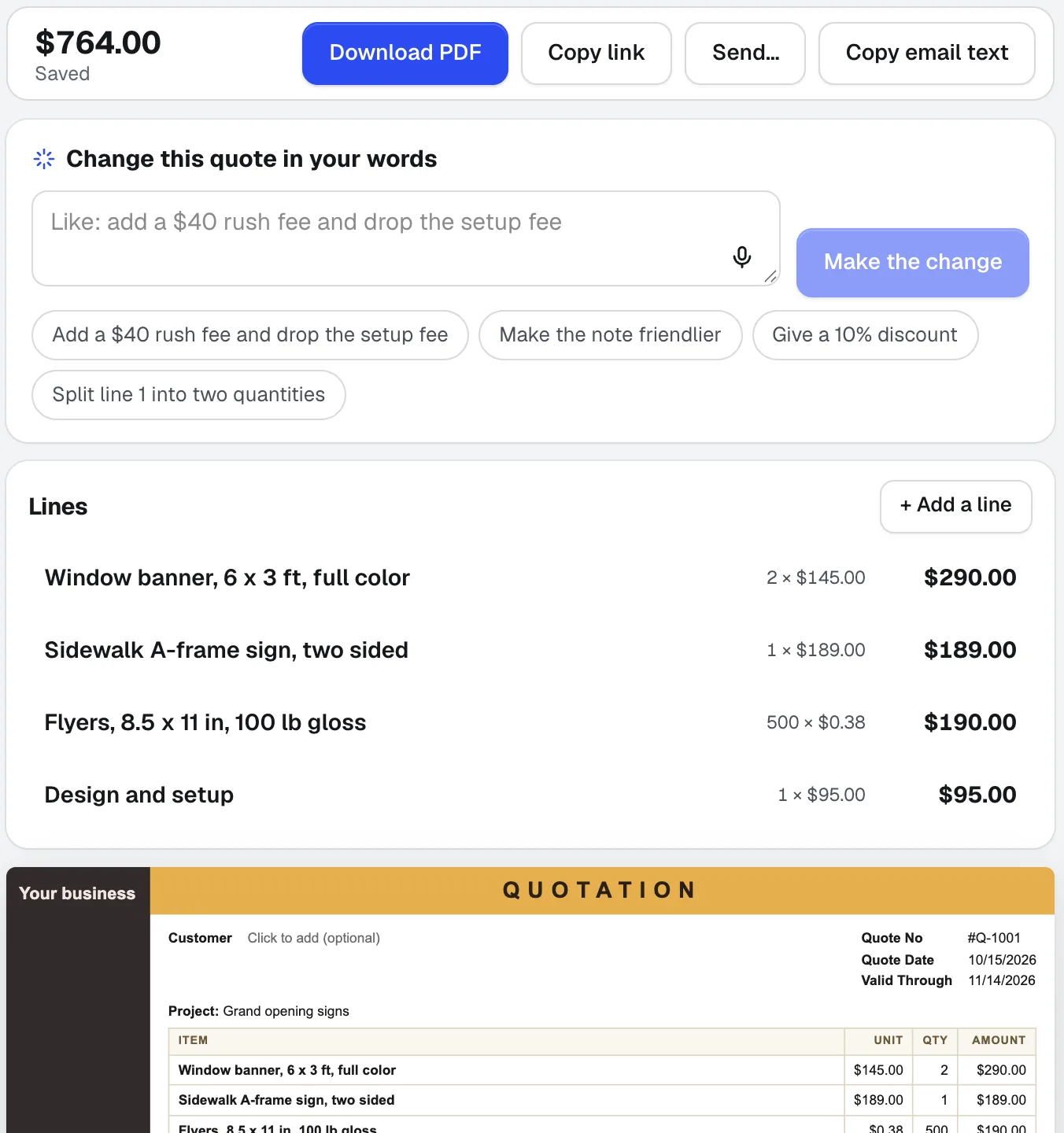
Mark a Quote Studio job Done or complete a booking, and that customer is added with your usual wait. One less thing to remember.
Every feature
Everything in Reviews & customer photos
The complete list, from the tool as it works today.
- Add customers one at a time or paste a list or CSV; send now, a set number of days after the job, or copy the link yourself
- Up to two reminders that stop on their own when the customer opens their page or reviews
- Sent, opened, clicked, reviewed, and went-to-Google counts, each one a click into the customers behind it
- A phone-first review page per customer: stars and words, your Google link for everyone, photos and short videos, and a private note
- An Inbox to keep, reply to, publish, or mark spam, with a spam filter that never deletes on its own
- Request wording written in your Brand Voice, checked so it never gates or rewards reviews
- A reviews wall and photo gallery for your aiKit website that updates within a minute of each publish
What’s included
What you get with Reviews & customer photos, and how it works with the rest of aiKit
Included with a free aiKit account
- Review requests aren't counted against a monthly number
- Add customers one at a time, or paste a list or CSV
- Up to two reminders that stop on their own
- Sent, opened, clicked, reviewed, and went-to-Google counts
- A phone-first review page per customer, plus one public page with a QR code
- An Inbox with a spam filter, and a reviews wall for your aiKit website
What uses AI, and what’s free
Writing request wording in your Brand Voice and suggested replies use your account's monthly tokens, shared with every aiKit tool. Sending, reminders, tracking, the review pages, the Inbox, and the reviews wall use no AI.
Works with your other aiKit tools
- Quote Studio: A Quote Studio job marked Done adds its customer and schedules the ask.
- Your websites: The reviews wall runs on your aiKit website, and completed bookings trigger an ask.
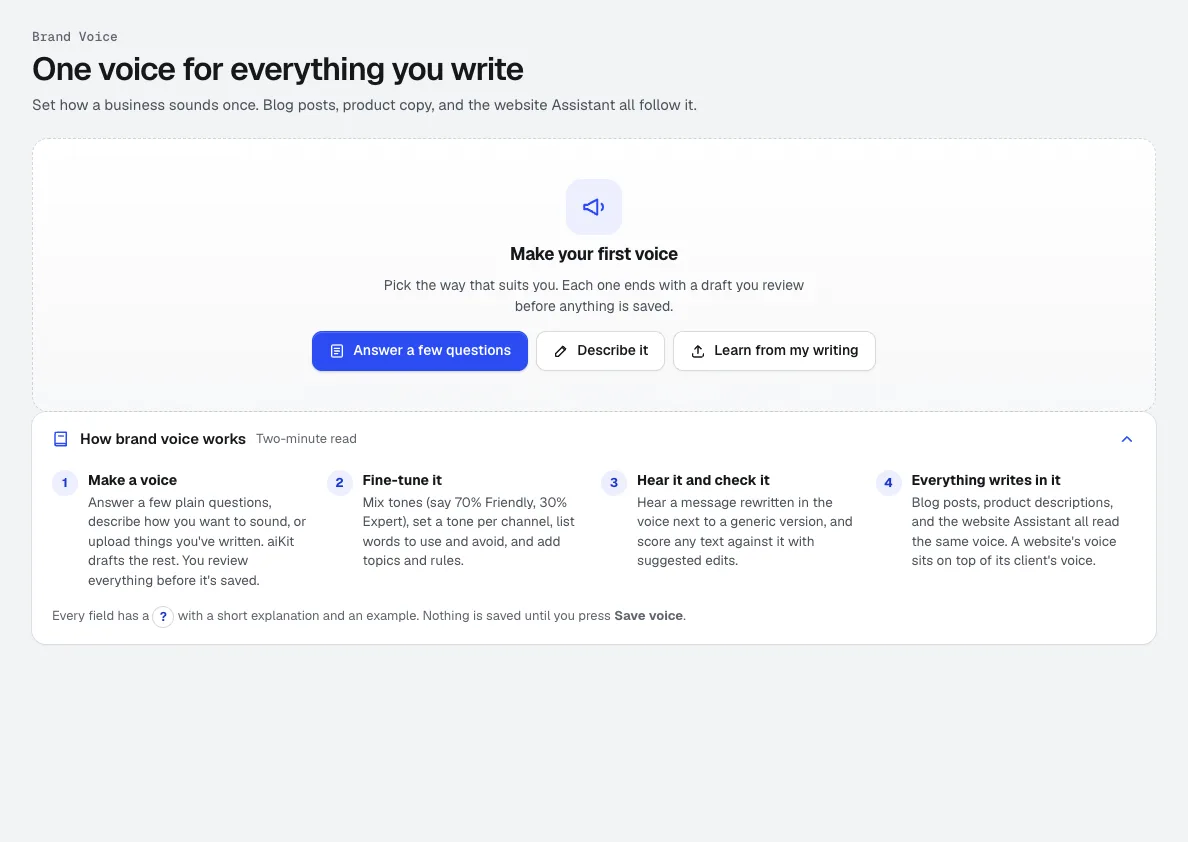
- Brand Kit: Request wording is written in your Brand Voice.
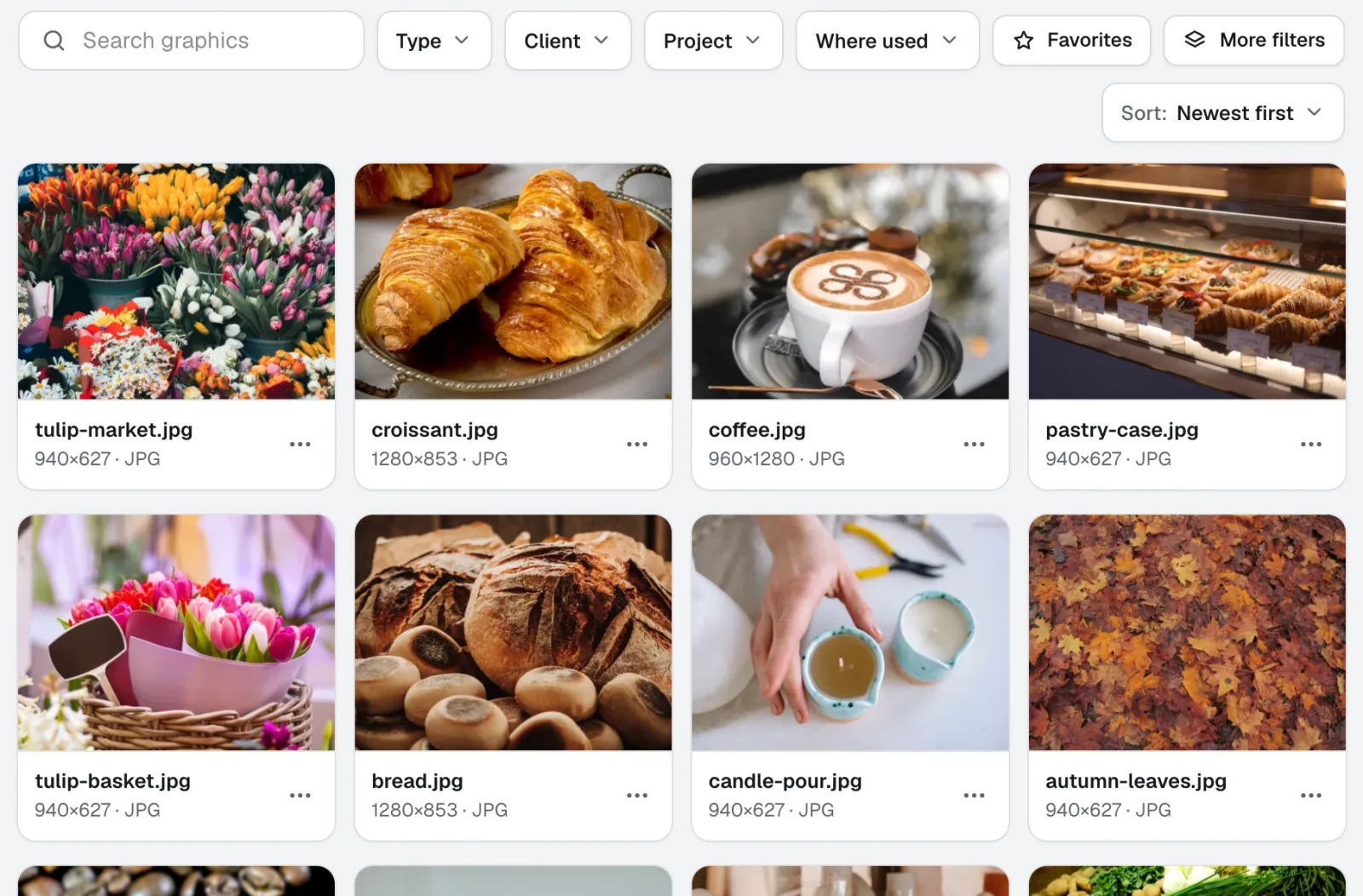
- Graphics Library: Published customer photos are saved to a Customer photos folder.
Keep Reviews & customer photos in any of your kits, next to the tools you use with it. One monthly AI allowance covers every tool you add.
How it works
From first click to finished, in 4 steps.
1. Set your Google link and wording once
Paste your Google review link or Place ID, and write the request (or have it written in your Brand Voice). What a customer sees shows the real email before anything goes out.
2. Add customers
One at a time, a pasted list, or a CSV of up to 500. Choose to ask now, a set number of days after the job, or copy the link and send it yourself.
3. Customers review from their phone
Each gets a private page: five big stars, a few words, your Google button, photos of the finished job, and an optional private note to you.
4. Reply and publish from the Inbox
Everything lands in your Inbox first. Reply (or have a reply suggested in your voice), keep it private, mark spam, or turn it on for your website.
Who it’s for
How different businesses use Reviews & customer photos
A review ask after every cleaning
A cleaning company pastes last week's 80 customers from a spreadsheet. Each is asked three days after their visit, at a daily limit of 20, and the month strip tracks progress toward a Google goal.
A QR code on every receipt
Maple Street Bakery prints its public review page's QR code on receipts. A link ending in ?src=google moves Google to the top for customers who scan it.
Photos of finished signs, from the customer
Harbor Line Print Co. asks customers to share a photo of their new banner in place. The best ones go on the website gallery and into the Graphics Library for social posts.
Reviews run the same way for each client
An agency sets up the same review ask for a contractor client, with the wording in the client's voice and the reviews wall on the client's aiKit site.
Testimonials after every closing
A brokerage adds each closed client with the closing date. Reviews the client OKs to show go on the brokerage's aiKit site with a public reply under each.
Ideal for
- Local service businesses that live on Google reviews: contractors, cleaners, salons, auto shops
- Shops and makers who want real customer photos of finished work
- Agencies running reviews for several client businesses
Good to know
- Not for: Buying, filtering, or hiding reviews: everyone gets the same ask and the same Google link
- Not for: Text-message requests (email and copy-a-link today)
- Not for: Reading or answering your Google reviews inside aiKit (that needs a Google connection, coming later)
- Emails go out once email is set up for your account; until then, copy each customer's link and send it yourself.
- Photos and videos are up to 4 MB each (photos are shrunk on the phone first); longer videos come in as a link.
- Google doesn't tell anyone whether a customer posted there, so Went to Google counts the button press, not the review.
- The AI's suggested wording and replies can miss the mark; read them before you save.
Good to know
Before you use Reviews & customer photos
Ask everyone, and never write reviews yourself. Ask every customer, not just happy ones. No rewards for good reviews. Never write reviews yourself.
Questions
Reviews & customer photos: questions people ask
How do I get more Google reviews without breaking Google's rules?
What is the best review request software for a service business?
What's included with Reviews on a free aiKit account?
Can I ask for reviews by text message?
What does aiKit Reviews do, and what does it leave to Google?
Can customers send photos and videos with their review?
Can AI write my review request emails?
How soon after a job should I ask for a review?
Can I offer a discount for a good review?
Can Reviews run on my own AI account instead of aiKit tokens?
What is aiKit Reviews & customer photos?
Does aiKit send only happy customers to Google?
Can I offer a discount or reward for a review?
How do I get my Google review link?
Can I see who opened and clicked my review requests?
Works well with
Tools to add to the same kit
Quote Studio
NewPaste a customer's email, dictate the job, or add a photo of a handwritten list. Quote Studio is quoting software that drafts a one-page quote using only your own prices, then you download the PDF or send a live page your customer accepts online.
Brand Kit
NewOne Brand Kit: a brand voice learned from your own writing, plus your logos, colors, fonts, reference emails and the results you liked. Emails, blog posts, videos, pictures and designs all follow it.
Graphics Library
NewGraphics Library is digital asset management software for teams: every client's and project's logos, photos and design files in one labeled place. Drop in whole folders, label hundreds at once, and anyone on your team finds the file they need.
Use Reviews & customer photos today.
Make a free aiKit account and open Reviews & customer photos, plus every other tool in your kit.
Page last checked against the product on 2026-10-16.